

- Accueil
- Aide et soutien
- Gammes de produits
- ABS Aeolian-M Aqua High Performance Gaming PC - Intel i5 13400F - GeForce RTX 4060 - AAMA134004060
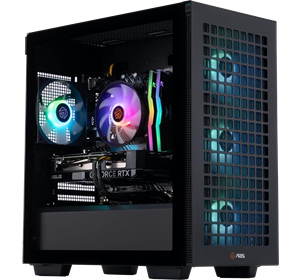
ABS Aeolian-M Aqua High Performance Gaming PC - Intel i5 13400F - GeForce RTX 4060 - AAMA134004060
Rechercher notre contenu de support
Sujets populaires
Pour une expérience optimisée à cette taille de fenêtre, veuillez actualiser votre navigateur.
Pour une expérience optimisée à cette taille de fenêtre, veuillez actualiser votre navigateur.
Motherboard
Motherboard
Name
ASUS Prime B660M-A AC DDR4
Motherboard user manual
Motherboard user manual
Body
Body
Dimensions (inches)
20.8x20.2x13.9 (HxDxW)
Weight (lbs)
27
Connectivity
Connectivity
Processor
Processor
Cooling system
RGB Air cooler
Processor core count
14
Processor thread count
20
Model
Intel Core i5 13400F
CPU speed
Up to 5GHz
Platform
Platform
Memory
Memory
Features
Features
Special features
VR ready
Graphics card
Graphics card
Graphics card type
NVIDIA GeForce RTX 4060 8G GDDR6
Warranty
Warranty
Device warranty
12 months
Power
Power
Power supply
Thermaltake 600W 80 Plus Gold
Storage
Storage
Hard drive capacity
1TB M.2 NVMe SSD
Built-in Devices
Built-in Devices
Optical drive
No
Key Information
Key Information
Type
High Performance
Interfaces/Ports
Interfaces/Ports
3.5mm audio output
Yes
Component output
Yes
Display port
Yes - 4
Ethernet port
Yes
HDMI port
Yes - 3
Microphone input
Yes
USB port
8x USB-A
Pour une expérience optimisée à cette taille de fenêtre, veuillez actualiser votre navigateur.
Cliquez sur l’une des cases de catégorie ci-dessous pour voir notre liste des derniers pilotes mis à jour pour votre PC.
To install your chipset drivers, follow the link below and follow the steps.
- Locate the 'Chipset' section.
- Select 'Show all.'
- Download the latest version of the following files:
- Intel Management Engine Interface
- Intel Chipset Driver
- Intel Dynamic Tuning Technology Driver
- Run the files once they're downloaded to install your chipset drivers.
To get the best performance and experience out of your Nvidia graphics card, we recommend that you first download the GeForce Experience if it's not already pre-installed, as this software will help keep your graphics drivers up-to-date.
If you'd like to install your graphics drivers separately, please see the link and steps below to install the latest Nvidia driver for your graphics card.
- Open the link above.
- Locate the Driver Downloads menu.
- Use the dropdowns to select your system's graphics card, operating system, and language.
- Press Search.
- Download your driver.
- Locate and run the file once it's downloaded.
- Follow the steps in the installer wizard to install your driver.
Avez-vous trouvé ce guide utile ?
Merci pour vos commentaires
Merci d’avoir pris le temps de nous faire part de vos commentaires. Tous les commentaires nous aident à continuer à fournir le meilleur support en ligne à nos clients et sont très appréciés.
